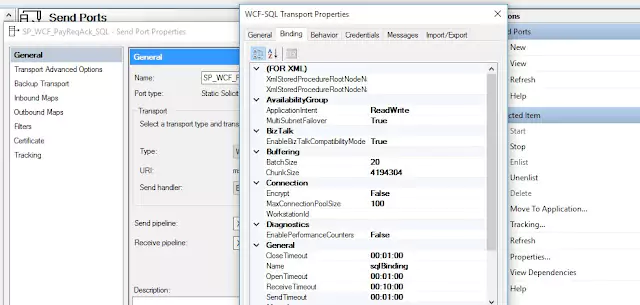
Configuring BizTalk WCF Timeout Binding Values
Timeout settings are important in WCF bindings as they can impact the performance, usability, and security of your service. WCF bindings offer four types of timeouts:
- OpenTimeout
- CloseTimeout
- SendTimeout
- ReceiveTimeout
Open Timeout: This timeout determines the time limit for a channel to open.
Close Timeout: This timeout is used to indicate the time limit for a channel to close.
Send Timeout: This timeout defines the time duration for a send operation to complete. It is recommended to increase this timeout when sending large messages, especially in a solicit-response scenario.
Receive Timeout: This timeout is used by the Service Framework Layer to initialize the session-idle timeout, which controls how long a session can be idle before it times out.
Below are examples of how to use these timeouts in C#, Config and BizTalk:
C# Timeout
public static void Main()
{
Uri baseAddress = new Uri("http://localhost/BizTalkLive/BizTalkService");

try
{
ServiceHost serviceHost = new ServiceHost(typeof(CalculatorService));

WSHttpBinding binding = new WSHttpBinding();
binding.OpenTimeout = new TimeSpan(0, 10, 0);
binding.CloseTimeout = new TimeSpan(0, 10, 0);
binding.SendTimeout = new TimeSpan(0, 10, 0);
binding.ReceiveTimeout = new TimeSpan(0, 10, 0);

serviceHost.AddServiceEndpoint("ICalculator", binding, baseAddress);
serviceHost.Open();

// The service can now be accessed.
Console.WriteLine("The service is ready.");
Console.WriteLine("Press <ENTER> to terminate service.");
Console.WriteLine();
Console.ReadLine();

}
catch (CommunicationException ex)
{
// Handle exception ...
}
}
Config
<configuration>
 <system.serviceModel>
  <bindings>
   <wsHttpBinding>
    <binding openTimeout="00:01:00"
     closeTimeout="00:01:00"
     sendTimeout="00:01:00"
     receiveTimeout="00:10:00">
    </binding>
   </wsHttpBinding>
  </bindings>
</system.serviceModel>
BizTalk Console