
Custom Event Logs Permissions Issue
Problem
I have encountered an error in my BizTalk Server Administration Console.
Reason: The source was not found, but some or all event logs could not be searched. To create the source, you need permission to read all event logs to make sure that the new source name is unique. Inaccessible logs: Security.
Cause
It seems that the problem is caused by the BizTalk user account that I am using to log my custom events, which has insufficient permissions. Whenever I attempt to create a custom event log by calling my event log method, the resulting custom event log entry is placed in the server registry as follows:
HKEY_LOCAL_MACHINE\SYSTEM\CurrentControlSet\Services\Eventlog
To write in this location, your user account needs to have full permissions. However, my user account is not authorized to write to the event log. As a result, the user running the application must have complete rights to establish a new custom log.
Solution
HKEY_LOCAL_MACHINE\SYSTEM\CurrentControlSet\Services\Eventlog
3. Right-click on EventLog and select Permissions. In the Permissions for EventLog dialog box, click Add, search for your user, and click OK. See the image below: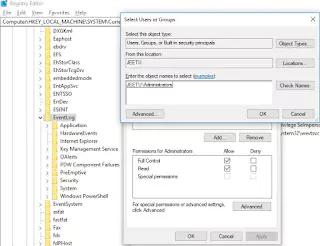

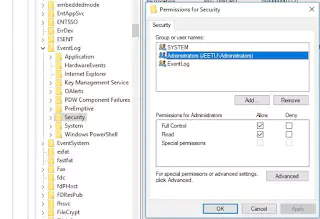
5. Navigate to the Security section located under the same EventLog registry sub-key. The path to reach the section is as follows:
HKEY_LOCAL_MACHINE\SYSTEM\CurrentControlSet\Services\Eventlog\Security
Once there, right-click on Security, select Permissions, and add the same user. Then grant Full Control permission to the user in a similar way as before. You can refer to the following image for reference.
“Alright, now please check again. Hopefully, the issue has been resolved.”